DB: NoSQL MongoDB: TL;DR
04 July 2024, Carlos Pena
- Motto: Data that is accessed together should be stored together
SQL vs NoSQL
| RDBMS  | MongoDB                    |
| ------ | -------------------------- |
| Table  | Collection                 |
| Row    | Document                   |
| Column | Field                      |
| Join   | Embedding/Linking($Lookup) |
Docker
docker pull mongodb/mongodb-community-server:latest
docker run -p 27017:27017 -d mongodb/mongodb-community-server:latest [--replSet myReplicaSet]
MongoSH
mongosh –port 27017
use mydatabase
db.createCollection("mycollection")
db.mycollection.insertOne({ name: "Carlos Pena", age: 28, occupation: "Engineer" })
db.mycollection.insertMany([
    { name: "Alfa", age: 25, occupation: "Designer" },
    { name: "Bravo", age: 30, occupation: "Manager" }
])
db.mycollection.find({ name: "Carlos Pena" }).pretty()
PyMongo
import random
import pymongo
from pymongo import MongoClient

client = MongoClient("localhost", 27017) # docker default
db = client["my_database"]
Create/Drop Table
collection = db["my_table"] # table -> collection
db.drop_collection("my_table")
Insert
collection.insert_one({"name": "Carlos Pena", "age": 28, "occupation": "Engineer"})
collection.insert_many(
    [
        {"name": f"A {idx}", "age": random.randint(0, 10_000), "occupation": "Designer"}
        for idx in range(1_000_000)
    ]
)
Update/Replace
collection.insert_one({"name": "Carlos Pena", "age": 28, "occupation": "Engineer"})
collection.update_one(
    {"name": "Carlos Pena"}, {"$set": {"age": 99, "occupation": "Data Engineer"}}
)
collection.update_many(
    {"name": "Carlos Pena"}, {"$set": {"age": 99, "occupation": "Data Engineer"}}
)
collection.replace_one(
    {"name": "Carlos Pena"}, {"name": "Carlos Pena Doe", "age": 0, "occupation": "Engineer"}
)
Delete
collection.delete_one({"name": "Carlos Pena"})  # Check output n
# DeleteResult({'n': 1, 'ok': 1.0}, acknowledged=True) ## Done
# DeleteResult({'n': 0, 'ok': 1.0}, acknowledged=True) ## Not found
collection.delete_many({"name": "Carlos Pena"})
collection.delete_many({"age": {"$lt": 18}})
Query
for doc in collection.find({"name": "Carlos Pena"}):
    print(doc)

for doc in collection.find({"age": {"$lt": 2}}):
    print(doc)
Index
collection.create_index({"age": pymongo.ASCENDING}) # returns index name
# Index Types: pymongo.ASCENDING, pymongo.DESCENDING, pymongo.GEO2D, pymongo.GEOSPHERE
#              pymongo.HASHED, pymongo.TEXT
# Main parameters:
# - `unique`: if ``True``, creates a uniqueness constraint on the index.
# - `background`: if ``True``, this index should be created in the background.

collection.drop_index("age_1")

# Perf: %%timeit
for _ in collection.find({"age": {"$eq": 10_000}}):
    pass
# WO Index: 260 ms ± 01.3 ms per loop (mean ± std. dev. of 7 runs, 1 loop each)
# W  Index: 232 μs ± 14.6 μs per loop (mean ± std. dev. of 7 runs, 1,000 loops each)
Text Search
# Setup
import random
import string

import pymongo
from pymongo import MongoClient

# Data
client = MongoClient("localhost", 27017)
db = client["mydatabase"]
collection = db["text_search_collection"]
collection.insert_many(
    [
        {
            "first_name": "".join(random.sample(string.ascii_letters, k=10)),
            "last_name": "".join(random.sample(string.ascii_letters, k=10)),
            "age": random.randint(0, 100),
        }
        for _ in range(1_000_000)
    ]
)
Text Index
collection.create_index({"first_name": pymongo.TEXT})
# Text search only works using the $text query operator.
# Warning: One Text Index Per Collection

for doc in collection.find({"first_name": {"$regex": "^AabB.*"}}):  # or "^AabB"
    print(doc)
# Wo Index: 442 ms ± 6.41 ms per loop (mean ± std. dev. of 7 runs, 1 loop each)
# W  Index: 294 μs ± 29.9 μs per loop (mean ± std. dev. of 7 runs, 1,000 loops each)


for doc in collection.find({"first_name": {"$regex": ".*AabB.*"}}):  # or "AabB"
    print(doc)
# W/Wo Index: 442 ms ± 6.41 ms per loop (mean ± std. dev. of 7 runs, 1 loop each)
# Cannot use index if prefix is unknown

# Regex case insensitive
collection.create_index({"first_name": pymongo.ASCENDING, "strength": 2})
# Case-insensitive indexes typically *do not* improve performance for $regex queries
for doc in collection.find({"first_name": {"$regex": "^AabB", "$options": "i"}}):
    print(doc)
# Wo Index: 433 ms ± 8.69 ms per loop (mean ± std. dev. of 7 runs, 1 loop each)

for doc in collection.find({"first_name": "bgGDTVwJnm"}):
    print(doc)
# collection.create_index({"first_name": pymongo.TEXT})
# Wo Index: 289 ms ± 1.6 ms per loop (mean ± std. dev. of 7 runs, 1 loop each)
# W  Index: 290 ms ± 2.3 ms per loop (mean ± std. dev. of 7 runs, 1 loop each)
# index not used as it is not a $regex; we need to create another index
collection.create_index({"first_name": pymongo.ASCENDING})
# W  Index: 269 μs ± 58.3 μs per loop (mean ± std. dev. of 7 runs, 1,000 loops each)
Text Index with multiple fields
collection.create_index({"first_name": pymongo.TEXT, "last_name": pymongo.TEXT})
# Text search only works using the $text query operator.
# Warning: One Text Index Per Collection
collection.insert_many(
    [
        {
            "first_name": "Carlos Henrique",
            "last_name": "Pena, Carlos",
            "age": 28,
        },
        {
            "first_name": "Carlos Henrique",
            "last_name": "Caloete Pena",
            "age": 28,
        },
        {
            "first_name": "Henrique",
            "last_name": "Pena, Carlos",
            "age": 28,
        },
    ]
)
for doc in collection.find({"$text": {"$search": "Carlos"}}):
    print(doc)
# 323 μs ± 63.8 μs per loop (mean ± std. dev. of 7 runs, 1,000 loops each)
# Matches the three docs
Embedding vs Referencing Pt 1: Theory
- Embedding:
- Single operation to: retrieve data; Update/delete
- Data duplication; large documents
- Used when data is accessed together frequently
- One-to-One, One-to-Many (when many is small)
- Referencing:
- No duplication; smaller documents
- Require to join data
- Used when data is not always needed when accessing the document:
- many-to-many, one-to-many (when many is large/unbounded)
- You (the code) need to maintain data consistency and avoid redundancy.
Example: Products (1) vs (N) Reviews
Embedding “One” Side
{
    "SKU": 4000,
    "Title": "Digital Microwave Oven 220v",
    "Price": 102.00,
    "reviews": [
        {"user": "Carlos", "text": "Ok."},
        {"user": "Henrique", "text": "Not good"},
        {"user": "Gabriel", "text": "Expensive"},
    ]
}
Embedding “Many/N” Side
{
    "user": "Carlos",
    "text": "Ok.",
    "product": {
        "SKU": 4000,
        "Title": "Digital Microwave Oven 220v",
        "Price": 102.00,
    }
}
{
    "user": "Henrique",
    "text": "Not good",
    "product": {
        "SKU": 4000,
        "Title": "Digital Microwave Oven 220v",
        "Price": 102.00,
    }
}
{
    "user": "Gabriel",
    "text": "Expensive",
    "product": {
        "SKU": 4000,
        "Title": "Digital Microwave Oven 220v",
        "Price": 102.00,
    }
}
Referencing “One” Side
{
    "SKU": 4000,
    "Title": "Digital Microwave Oven 220v",
    "Price": 102.00,
    "reviews": [111, 589, 999]
}
{
    "id": 111,
    "user": "Carlos",
    "text": "Ok."
}
{
    "id": 589,
    "user": "Henrique",
    "text": "Not good"
}
{
    "id": 999,
    "user": "Gabriel",
    "text": "Expensive"
}
Referencing “Many/N” Side
{
    "id": 1024,
    "SKU": 4000,
    "Title": "Digital Microwave Oven 220v",
    "Price": 102.00,
}
{
    "product_id": 1024,
    "user": "Carlos",
    "text": "Ok."
}
{
    "product_id": 1024,
    "user": "Henrique",
    "text": "Not good",
}
{
    "product_id": 1024,
    "user": "Gabriel",
    "text": "Expensive",
}
Referencing many-to-many
{
    "id": 1024,
    "SKU": 4000,
    "Title": "Digital Microwave Oven 220v",
    "Price": 102.00,
    "reviews": [100, 200, 300]
}
{
    "id": 100,
    "product_id": 1024,
    "user": "Carlos",
    "text": "Ok."
}
{
    "id": 200,
    "product_id": 1024,
    "user": "Henrique",
    "text": "Not good",
}
{
    "id": 300,
    "product_id": 1024,
    "user": "Gabriel",
    "text": "Expensive",
}
Embedding vs Referencing Pt 2: Python
Embedding (One side)
catalog = db["catalog"]

products = [
    {
        "sku": 4,
        "title": "Notebook",
        "price": 1000.50,
        "reviews": [
            {
                "review_id": 1,
                "reviewer": "Alice",
                "rating": 5,
                "comment": "Great Notebook!",
            },
            {
                "review_id": 2,
                "reviewer": "Bob",
                "rating": 4,
                "comment": "Good value for money.",
            },
        ],
    },
    {
        "sku": 103,
        "title": "Smartphone",
        "price": 699.00,
        "reviews": [
            {
                "review_id": 3,
                "reviewer": "Charlie",
                "rating": 4,
                "comment": "Very nice phone.",
            },
            {
                "review_id": 4,
                "reviewer": "Dave",
                "rating": 3,
                "comment": "Average battery life.",
            },
        ],
    },
]
catalog.insert_many(products)

catalog.find_one({"sku": 4})

# Update new review
new_review = {
    "review_id": 5,
    "reviewer": "Eve",
    "rating": 5,
    "comment": "Excellent performance.",
}
catalog.update_one({"sku": 4}, {"$push": {"reviews": new_review}})
# UpdateResult({'n': 1, 'nModified': 1, 'ok': 1.0, 'updatedExisting': True}, acknowledged=True); Updated
# UpdateResult({'n': 0, 'nModified': 0, 'ok': 1.0, 'updatedExisting': False}, acknowledged=True); Not found

# Delete review
catalog.update_one({"sku": 103}, {"$pull": {"reviews": {"review_id": 4}}})
# UpdateResult({'n': 1, 'nModified': 1, 'ok': 1.0, 'updatedExisting': True}, acknowledged=True) # Removed
# UpdateResult({'n': 1, 'nModified': 0, 'ok': 1.0, 'updatedExisting': True}, acknowledged=True) # Product found, but review not
# UpdateResult({'n': 0, 'nModified': 0, 'ok': 1.0, 'updatedExisting': False}, acknowledged=True) # Product not found
Referencing (One side)
db.products.drop()
db.reviews.drop()

catalog = db["catalog"]
reviews = db["reviews"]

products = [
    {"sku": 1, "title": "Notebook", "price": 1000.50, "review_ids": [1, 2]},
    {"sku": 2, "title": "Smartphone", "price": 699.00, "review_ids": [3, 4]},
]
user_reviews = [
    {"_id": 1, "reviewer": "Alice", "rating": 5, "comment": "Great Notebook!"},
    {"_id": 2, "reviewer": "Bob", "rating": 4, "comment": "Good value for money."},
    {"_id": 3, "reviewer": "Charlie", "rating": 4, "comment": "Very nice phone."},
    {"_id": 4, "reviewer": "Dave", "rating": 3, "comment": "Average battery life."},
    {"_id": 5, "reviewer": "Eve", "rating": 5, "comment": "Excellent performance."},
]

reviews.insert_many(user_reviews)
catalog.insert_many(products)

# Find reviews of a product
product = catalog.find_one({"sku": 1})
# assert product is not None
reviews.find({"_id": {"$in": product["review_ids"]}})
for r in reviews.find({"_id": {"$in": product["review_ids"]}}):
    pprint(r)


# Add new review (update catalog)
new_review = {
    "_id": 6,
    "reviewer": "Frank",
    "rating": 4,
    "comment": "Solid build quality.",
}
reviews.insert_one(new_review)
catalog.update_one({"sku": 1}, {"$push": {"review_ids": new_review["_id"]}})


# Delete a review (update catalog)
reviews.delete_one({"_id": 2})
products_with_deleted_review = catalog.find({"review_ids": 2})
for p in products_with_deleted_review:
    # If `_id` is not specified, mongodb will generated automatically on insert
    r = catalog.update_one({"_id": p["_id"]}, {"$pull": {"review_ids": 2}})
Operations: $lookup, $unwind, …
- $Match
pipeline = [
    {
        "$match": {
            "$or": [
                {"price": {"$gt": 10.70, "$lt": 11}},
                # Do not exists review_ids[1]; aka len(review_ids) <= 1
                {
                    "$and": [
                        {"review_ids.1": {"$exists": False}},
                        {"price": {"$gte": 999.55}},
                    ]
                },
            ]
        }
    }
]
catalog.aggregate(pipeline)
{ # 10.70 < price < 11
    "_id": 1510,
    "price": 10.76,
    "review_ids": [38904, ..., 67487],
    "title": "Universal demand-driven moratorium",
}
{ # 10.70 < price < 11
    "_id": 8601,
    "price": 10.95,
    "review_ids": [20853, ..., 30405],
    "title": "Multi-lateral upward-trending moderator",
}
{ # (999.55 <= price) and (len(review_ids) <= 1)
    "_id": 3562,
    "price": 999.76,
    "review_ids": [55444],
    "title": "Visionary incremental installation",
}
{ # (999.55 <= price) and (len(review_ids) <= 1)
    "_id": 583,
    "price": 999.89,
    "review_ids": [],
    "title": "Quality-focused system-worthy customer loyalty",
}
- $Lookup (left join)
// Syntax
{
   $lookup:
     {
       from: <collection to join>,
       localField: <field from the input documents>,
       foreignField: <field from the documents of the "from" collection>,
       as: <output array field>
     }
}
results = catalog.aggregate(                 # From "catalog c"
    [
        {"$match": {"price": {"$gt": 10.70, "$lt": 11}}},
        {
            "$lookup": {
                "from": "reviews",           # Join "reviews r"
                "localField": "review_ids",  # On (c.review_ids = r._id)
                "foreignField": "_id",
                "as": "reviews",             # select foo as reviews, c.* (kinda)
            }
        }
    ]
)

for result in results:
    pprint(result)

{
    "_id": ObjectId("6687c337d7dc1ee1b75d15aa"),
    "price": 10.75,
    "review_ids": [1, 6],
    "reviews": [
        {"_id": 1, "comment": "Great Notebook!", "rating": 5, "reviewer": "Alice"},
        {"_id": 6, "comment": "Solid build quality.", "rating": 4, "reviewer": "Frank"},
    ],
    "sku": 1,
    "title": "Notebook",
}
{
    ...
}
- $Unwind
Deconstructs an array field from the input documents to output a document for each element. Each output document is the input document with the value of the array field replaced by the element.
// From:
{ _id : 1, item : 'Shirt', sizes: ['S', 'M', 'L'] }
// To:
{ _id: 1, item: 'Shirt', sizes: 'S' },
{ _id: 1, item: 'Shirt', sizes: 'M' },
{ _id: 1, item: 'Shirt', sizes: 'L' },
results = catalog.aggregate(                 # From "catalog c"
    [
        {"$match": {"price": {"$gt": 10.70, "$lt": 11}}},
        {
            "$lookup": {
                "from": "reviews",           # Join "reviews r"
                "localField": "review_ids",  # On (c.review_ids = r._id)
                "foreignField": "_id",
                "as": "reviews",             # select foo as reviews, c.* (kinda)
            }
        },
        {"$unwind": "$reviews"},
    ]
)

for result in results:
    pprint(result)

{
    "_id": ObjectId("6687c337d7dc1ee1b75d15aa"),
    "price": 10.75,
    "review_ids": [1, 6],
    "reviews": {"_id": 6, "comment": "Solid build quality.", "rating": 4, "reviewer": "Frank"},
    "sku": 1,
    "title": "Notebook",
}
{
    "_id": ObjectId("6687c337d7dc1ee1b75d15aa"),
    "price": 10.75,
    "review_ids": [1, 6],
    "reviews": {"_id": 1, "comment": "Great Notebook!", "rating": 5, "reviewer": "Alice"},
    "sku": 1,
    "title": "Notebook",
}
{
...
}
- $Group
{
 $group:
   {
     _id: <expression>,
     <field1>: { <accumulator1> : <expression1> },
     ...
   }
}
// $avg, $bottom, $bottomN, $count, $first, $last,
// $max, $median, $minN, $stdDevPop, $sum, $top, ...
Give a list of products:
- 10.70 < Price < 11.00
- Reviews with rating from 2 to 4
results = catalog.aggregate(  # From "catalog c"
    [
        {"$match": {"price": {"$gt": 10.70, "$lt": 11}}},
        {
            "$lookup": {
                "from": "reviews",  # Join "reviews r"
                "localField": "review_ids",  # On (c.review_ids = r._id)
                "foreignField": "_id",
                "as": "reviews",  # select foo as reviews, c.* (kinda)
            }
        },
        {"$unwind": "$reviews"},
        # reviews with score from 2 to 4
        {"$match": {"reviews.rating": {"$gte": 2, "$lte": 4}}},
        {
            "$group": {
                "_id": "$_id",
                "title": {"$first": "$title"},
                "price": {"$first": "$price"},
                "review_ids": {"$first": "$review_ids"},
                "reviews": {"$push": "$reviews"},
                # Average of reviews with score from 2 to 4
                "reviews_avg": {"$avg": "$reviews.rating"},
                "reviews_count": {"$count": {}},
            }
        },
    ]
)
for r in results:
    pprint(r)

{
    "_id": ObjectId("6687c337d7dc1ee1b75d15aa"),
    "price": 10.75,
    "review_ids": [1, 6],
    "reviews": [{"_id": 6, "comment": "Solid build quality.", "rating": 4, "reviewer": "Frank"}],
    "sku": 1,
    "title": "Notebook",
    "reviews_avg": 4
    "reviews_count": 1
}
...
- $sort
{ $sort: { <field1>: <sort order>, <field2>: <sort order> ... } }
Sort results by:
- Score: DESC
- _ID: ASC
results = catalog.aggregate(  # From "catalog c"
    [
        {"$match": {"price": {"$gt": 10.70, "$lt": 11}}},
        {
            "$lookup": {
                "from": "reviews",  # Join "reviews r"
                "localField": "review_ids",  # On (c.review_ids = r._id)
                "foreignField": "_id",
                "as": "reviews",  # select foo as reviews, c.* (kinda)
            }
        },
        {"$unwind": "$reviews"},
        {"$sort": {"reviews.rating": -1, "reviews._id": 1}},
        {
            "$group": {
                "_id": "$_id",
                "title": {"$first": "$title"},
                "price": {"$first": "$price"},
                "review_ids": {"$first": "$review_ids"},
                "reviews": {"$push": "$reviews"},
                # Average of reviews with score from 2 to 4
                "reviews_avg": {"$avg": "$reviews.rating"},
                "reviews_count": {"$count": {}},
            }
        },
    ]
)
...

{
    "reviews": [
        {
            "_id": 31468,
            "comment": "Still political newspaper tend those degree " "practice.",
            "rating": 5,
            "reviewer": "Angela Garcia DVM",
        },
        {
            "_id": 37503,
            "comment": "Nearly including reason any throughout rest.",
            "rating": 5,
            "reviewer": "Wendy Estes",
        },
        {
            "_id": 190,
            "comment": "Within ground site start although information sign "
            "product hold middle determine.",
            "rating": 4,
            "reviewer": "Susan Gamble",
        },
        {
            "_id": 18932,
            "comment": "Husband through structure glass fill real smile.",
            "rating": 4,
            "reviewer": "Desiree Ramirez",
        },
        {
            "_id": 25235,
            "comment": "Collection music person magazine fill blood similar " "again.",
            "rating": 4,
            "reviewer": "Jeffrey Yu",
        }
        ...
    ],
    "reviews_avg": 2.6875,
    "reviews_count": 16,
    "title": "Universal demand-driven moratorium",
}
Explain Plan
# Populate
from random import randint, uniform
from faker import Faker

# Insert reviews in batches to avoid memory issues
batch_size = 1000
num_products = 10000
num_reviews = 100000
fake = Faker()

# Reviews
fake_reviews = []
for i in range(0, num_reviews):
    review = {
        "_id": i,
        "reviewer": fake.name(),
        "rating": randint(1, 5),
        "comment": fake.sentence(nb_words=10),
    }
    fake_reviews.append(review)
for i in range(0, len(fake_reviews), batch_size):
    reviews.insert_many(fake_reviews[i : i + batch_size])

# Catalog
products = []
for i in range(0, num_products):
    num_product_reviews = randint(0, 20)
    product_review_ids = [randint(1, num_reviews) for _ in range(num_product_reviews)]
    product = {
        "_id": i,
        "title": fake.catch_phrase(),
        "price": round(uniform(10, 1000), 2),
        "review_ids": product_review_ids,
    }
    products.append(product)

for i in range(0, len(products), batch_size):
    catalog.insert_many(products[i : i + batch_size])
# Dummy query
catalog.find({"price": {"$lt": 11}}).explain()
| Without Index | With Index |
|---|---|
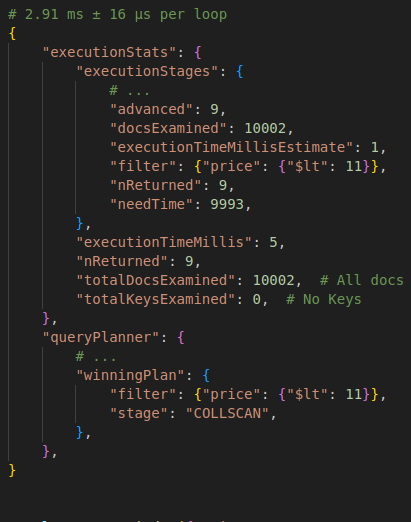 |
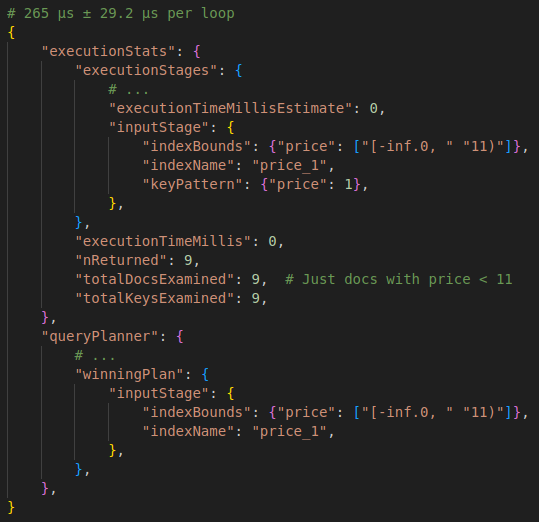 |
- For more complex queries, such as multiple-documents, the “.explain” may fail; In these cases we can use the
pymongoexplainlib
from pymongoexplain import ExplainableCollection
pipeline = [
    {
        "$lookup": {
            "from": "reviews",  # "catalog c" (omitted) Join "reviews r"
            "localField": "review_ids",  # On (c.review_ids = r._id)
            "foreignField": "_id",
            "as": "reviews",  # select foo as reviews, *
        }
    }
]
pprint(ExplainableCollection(catalog).aggregate(pipeline))
Workshop: Data Modeling for MongoDB
The methodology is a cascade: each step feeds the next, and only the last one is about “tuning”.
Entities  ->  Workloads  ->  Relationships  ->  Patterns
(what)        (how it is     (embed or         (optimize /
              used)          reference)         anti-patterns)
Unlike SQL, there is no “correct” schema derived from the data alone: the same entities produce different schemas depending on how they are read and written.
1. Entities
- Identify the entities
- Describe their properties (with the PM)
- Understand the relationships (cardinality, not only “A has B”)
Output: entity list + properties + cardinalities. Still no _id, no embedding
decision.
2. Workloads
- Qualify the operations: who reads/writes what, and which fields are needed together
- Quantify the operations: rate, and how much data each one moves
| Entities | Operation | Information Needed | Type | Rate |
|---|---|---|---|---|
| Books* | Fetch book details | Book details + rating | Read | 1000/sec |
| Authors, Books* | Fetch an author and their books | Book titles + author details | Read | 50/sec |
| Print Books | Fetch printed book titles where the stock level has fallen below 50 | Book details + stock level | Read | 2/day |
| Books* | Add/update book | Book details + stock level | Write | 10/hour |
| Print Books | Sell copy of printed book | Stock level | Write | 5/sec |
| Reviews | Fetch 10 reviews for a book | Reviews + reviewer rating | Read | 200/sec |
| Reviews | Add review | Review + book rating | Write | 50/sec |
| Users | Fetch user details | User details | Read | 5/min |
| Users | Add/update user | User details | Write | 1/sec |
* eBooks, Audiobooks, and Printed Books
Reading the table is the whole point; the numbers decide the schema:
Fetch book detailsat 1000/sec is the dominant read: everything it needs (including the rating) should live in one document, one query, no$lookup.ratingis read 1000/sec but written 50/sec (add review): compute it on write and store it in the book (computed pattern), instead of aggregating on read.Fetch printed book titles below stock 50runs 2/day: a rare report should not distort the schema, and probably does not deserve its own index.- Read/write ratios also tell where duplication is cheap:
Add/update bookat 10/hour makes denormalized book fields (title, author name) safe to copy.
3. Relationships
- Identify and quantify (how many “many”? bounded or unbounded?)
- Embed or reference
| Cardinality | Default | Why |
|---|---|---|
| 1:1 | Embed | Always read together |
| 1:1 (large / rarely read) | Reference | Keeps the hot document small |
| 1:few (bounded) | Embed | Single read, array cannot explode |
| 1:many (unbounded) | Reference | 16 MB document limit + index cost |
| many:many | Reference on the queried side | Avoids duplicating both sides |
Array of references goes on the more often queried side: if you always ask
“which authors wrote this book?”, the array lives in book.
// Book document                      // Author documents
{ title: "The Talisman", authors: [1, 2] }   { _id: 1, name: "Stephen King" }
{ title: "It",           authors: [1]    }   { _id: 2, name: "Peter Straub" }
{ title: "Floating Dragon", authors: [2] }
See Embedding vs Referencing Pt 1: Theory for the trade-offs and Pt 2 for the PyMongo code.
4. Patterns
- Optimize the schema
- Avoid anti-patterns
- Sometimes it is OK to duplicate info to reduce joins - consistency becomes your application’s job
Schema Design Anti-Patterns
| Anti-Pattern | Definition | Usual fix |
|---|---|---|
| Avoid Unbounded Arrays | A document stores an unbounded array that can grow to be too large. The large array can exceed the document size limit and cause a decrease in index performance. | Reference, or bucket the array into chunks |
| Reduce Number of Collections | You create a large number of collections in your database. Having too many collections can decrease storage engine performance. | Merge collections that share a shape/access path |
| Remove Unnecessary Indexes | Your collection contains unnecessary indexes. Unnecessary indexes consume additional disk space and can degrade write performance. | Drop indexes no workload uses (check the $indexStats) |
| Reduce Bloated Documents | Your collection has excessively large documents. The large documents can degrade the performance of your most common queries. | Subset pattern: keep the hot fields, move the rest |
| Reduce $lookup Operations | You are running too many $lookup operations on your data. This increases query complexity and reduces query performance. | Embed, or duplicate the few fields you join for |
Each anti-pattern is a workload problem, not a style problem: it only hurts if it sits on a hot operation of the table above.
Schema Validation
MongoDB is schemaless, not validation-less - you can enforce a JSON Schema per collection.
db.create_collection(
    "books",
    validator={
        "$jsonSchema": {
            "bsonType": "object",
            "required": ["title", "authors"],
            "properties": {
                "title": {"bsonType": "string"},
                "authors": {"bsonType": "array", "items": {"bsonType": "int"}},
                "rating": {"bsonType": "double", "minimum": 0, "maximum": 5},
            },
        }
    },
    validationLevel="strict",   # "strict" | "moderate" | "off"
    validationAction="error",   # "error" | "warn" (log only)
)

# Add/relax validation on an existing collection
db.command("collMod", "books", validationLevel="moderate")
- Strict: applies to every insert and every update, on all documents
- Moderate: only new documents and updates to documents that are already valid - legacy documents that fail the rules keep accepting other changes (useful while migrating a collection)
Workshop: Vector Search
Searching for data with MongoDB
| Method | Description |
|---|---|
.find() |
Basic query capabilities; great for retrieving a single document, or known criteria. |
| Full-text search | Great to find words that aren’t grouped; easily add fuzzy matching or autocomplete. |
| Vector search | Search based on meaning; great to retrieve related content or to search for similar topics. |
Generating embeddings with an Atlas Trigger
Every time a movie is written, an Atlas Trigger calls an Atlas Function that
sends the plot (text) to the Voyage AI embeddings API; on success, the
returned embedding is written back into the same document.
insert/update/replace on movies  ->  Trigger  ->  Function  ->  Voyage AI (/v1/embeddings)
                                                     |
                                                     +-> updateOne({_id}, {$set: {plot_embedding}})
Trigger configuration
| Setting | Value |
|---|---|
| Trigger Type | Database |
| Cluster | Cluster0 |
| Database Name | sample_mflix |
| Collection Name | movies |
| Operation Type | Insert Document, Update Document, Replace Document |
| Full Document | On (the function needs fullDocument.plot) |
| Document Pre-Image | Off |
| Event Type | Function |
- Serverless instances cannot be used as a database trigger source.
- Avoid an infinite loop: the function’s own
$setis an update, which fires the trigger again. Add a match expression so only changes toplotfire it:
{
  "$or": [
    { "operationType": { "$in": ["insert", "replace"] } },
    { "updateDescription.updatedFields.plot": { "$exists": true } }
  ]
}
Function
Store the API key as an App Services Secret, linked to a Value
(VOYAGE_API_KEY), so it never lives in the function code.
exports = async function (changeEvent) {
  const doc = changeEvent.fullDocument;
  if (!doc || !doc.plot) return;

  try {
    const response = await context.http.post({
      url: "https://api.voyageai.com/v1/embeddings",
      headers: {
        "Content-Type": ["application/json"],
        Authorization: [`Bearer ${context.values.get("VOYAGE_API_KEY")}`],
      },
      body: JSON.stringify({
        input: [doc.plot],
        model: "voyage-3",        // 1024 dimensions
        input_type: "document",   // use "query" when embedding the search text
      }),
    });

    let responseData = JSON.parse(response.body.text());
    if (response.statusCode === 200) {
      console.log("Successfully received embedding.");

      const embedding = responseData.data[0].embedding;

      // Service name = the linked data source (cluster) name
      const collection = context.services.get("Cluster0").db("sample_mflix").collection("movies");

      const result = await collection.updateOne(
        { _id: doc._id },
        { $set: { plot_embedding: embedding } }
      );
      console.log(`Updated ${result.modifiedCount} document(s).`);
    } else {
      console.log(`Failed to receive embedding. Status code: ${response.statusCode}`);
    }
  } catch (err) {
    console.error(err);
  }
};
Skip List (the intuition behind HNSW)
Atlas Vector Search finds approximate nearest neighbors with HNSW (Hierarchical Navigable Small World), a graph version of a skip list: upper layers hold few nodes and take long jumps, lower layers hold more nodes and take short ones.
Layer 3   A ----------> C ----------------------------------> I
Layer 2   A ----------> C ----------------------> G --------> I
Layer 1   A ----------> C ----------> E --------> G --------> I
Layer 0   A --> B --> C --> D --> E --> F --> G --> H --> I
Search: start at the top layer and move right while the next node is <= the target; when it would overshoot, drop one layer and continue.
- Find 9 (I): Layer 3
A -> C -> I, 2 hops (Layer 0 alone takes 8) - Find 5 (E): Layer 3
A -> C(I overshoots, drop) -> Layer 2C(G overshoots, drop) -> Layer 1C -> E
In HNSW the “next node” is the neighbor closest to the query vector, and the search stops descending at Layer 0 with the closest candidates found.
Navigable Small World (NSW) Graph
Vectors have no “left/right” order, so instead of a sorted list each vector is a node linked to a few of its nearest neighbors (plus some long links), forming a graph where any node is reachable in a few hops.
   (A) -------------------------------- (B)
    | \                              /   |
    |   \                         /      |
    |     \                    /         |
    |       \              /             |
    |   q     (C) ------                 |
    |       /    \                       |
    |     /        \                     |
   (D) ------------ (E) --------------- (F)

q = query vector
Greedy search for q:
- Start at an entry node (e.g.
B) - Look at its neighbors and move to the one closest to
q(B -> C) - Repeat until no neighbor is closer than the current node (
C, orD) - That local minimum is the (approximate) nearest neighbor
The result is approximate: greedy steps can get stuck in a local minimum.
Keeping a list of candidates (numCandidates in $vectorSearch) instead of a
single node trades speed for recall.
HNSW = NSW + skip list: stack NSW graphs in layers - sparse upper layers for long jumps toward the right region, the dense Layer 0 for the fine search.
Configure the index definition
db.movies.createSearchIndex(
  "vectorPlotIndex",
  "vectorSearch",
  {
    "fields": [
      {
        "type": "vector",
        "path": "plot_embedding",
        "numDimensions": 1024,
        "similarity": "euclidean | cosine | dotProduct"
      }
    ]
  }
);
numDimensionsmust match the embedding model (voyage-3-> 1024)similarity: see How to choose a similarity function
# PyMongo
from pymongo.operations import SearchIndexModel

collection.create_search_index(
    SearchIndexModel(
        name="vectorPlotIndex",
        type="vectorSearch",
        definition={
            "fields": [
                {
                    "type": "vector",
                    "path": "plot_embedding",
                    "numDimensions": 1024,
                    "similarity": "dotProduct",
                }
            ]
        },
    )
)
How to choose a similarity function
- Check the documentation of the embedding model
- Experiment
   Euclidean               Dot product              Cosine
   ^   dog                 ^   dog                  ^   dog
   |   *                   |   *                    |   *
   |    \  <- distance     |  /  .                  |  /
   |     * cat             | /    * cat             | / ) <- angle
   |    /                  |/    /                  |/   * cat
   +---------->            +---------->             +---------->
| Function | Measures | Formula | Use when |
|---|---|---|---|
euclidean |
Distance between the vector ends | sqrt(sum((a_i - b_i)^2)) |
Magnitude matters (e.g. counts, coordinates) |
dotProduct |
Projection of one vector onto the other | sum(a_i * b_i) |
Vectors are normalized (fastest; same ranking as cosine) |
cosine |
Angle between the vectors | a . b / (norm(a) * norm(b)) |
Only direction matters; vectors not normalized |
dog [0.243, 0.765, ...] and cat [0.243, 0.774, ...] are close by all three
measures. For normalized vectors (length 1), the three give the same ranking,
which is the usual case for text embedding models such as Voyage AI.
Use the same embedding model to encode the query
The search text must be embedded with the same model and dimensions as the
stored documents, but with input_type = "query" (documents use "document").
public List<Double> getEmbeddings(String text) {

    var request = new EmbeddingsRequest(
            List.of(text),  // input
            "voyage-3",     // model
            "query",        // input_type
            1024            // output_dimension (must match plot_embedding)
    );

    var response = client.embed(request);

    return response.data()
            .getFirst()
            .embedding();
}
Define the parameters of the $vectorSearch
pipeline = [
    {
        "$vectorSearch": {
            "index": "vectorPlotIndex",
            "path": "plot_embedding",
            "queryVector": embedding,
            "numCandidates": 100,
            "limit": 10,
        }
    },
    {"$project": {"title": 1, "plot": 1, "score": {"$meta": "vectorSearchScore"}}},
]
for doc in collection.aggregate(pipeline):
    print(doc)
| Parameter | Description |
|---|---|
index |
Name of the vector search index (createSearchIndex) |
path |
Indexed vector field |
queryVector |
Query embedding: same model, same numDimensions |
numCandidates |
Nearest neighbors the HNSW search keeps; more = better recall, slower (10-20x limit) |
limit |
Documents returned; must be <= numCandidates |
$vectorSearchmust be the first stage of the pipelineexact: true(instead ofnumCandidates) runs an exact (ENN) searchfilterpre-filters on fields indexed as"type": "filter"in the index
Add the filter with parameters
Filters are essential: without them, the nearest neighbors can be semantically close but useless (wrong year, language, tenant, out of stock…).
pipeline = [
    {
        "$vectorSearch": {
            "index": "vectorPlotIndex",
            "path": "plot_embedding",
            "queryVector": embedding,
            "numCandidates": 100,
            "limit": 10,
            "filter": {"year": {"$gt": 2010}},
        }
    },
    ...
]
The filtered field must be declared in the index as "type": "filter":
db.movies.updateSearchIndex("vectorPlotIndex", {
  "fields": [
    { "type": "vector", "path": "plot_embedding", "numDimensions": 1024, "similarity": "dotProduct" },
    { "type": "filter", "path": "year" }
  ]
});
- Pre-filter (
filterinside$vectorSearch): applied during the HNSW search, solimitresults still come back, all matching the filter - Post-filter (
$matchafter$vectorSearch): filters only thelimitresults already returned - may end with fewer (or zero) documents - Operators:
$eq,$ne,$gt,$gte,$lt,$lte,$in,$nin,$and,$or,$not,$exists
Quantization
When vector datasets hit physical limits
As datasets grow, the resource demands of high-dimensional vector embeddings become a bottleneck:
- Storing millions of vectors in memory for fast retrieval takes a toll on computing resources (HNSW is fast only while the index fits in RAM)
- On-disk footprint of large vector indexes
2M product embeddings x 1536 dims x 4 bytes (float32) = ~12.3 GB of RAM
Scalar vs Binary
Recommended for collections > 100,000 vectors.
The vector in the database stays the same; only the index shrinks it.
Document (collection)                    Index (vectorPlotIndex)
plot_embedding: [0.243, 0.765, ...]  ->  scalar: [31, 97, ...]   (int8)
float32, untouched                       binary: [1, 1, ...]     (1 bit)
| Quantization | Goal | Stores each dimension as | Memory footprint |
|---|---|---|---|
none |
Full fidelity | float32 (32 bits) | 100% |
scalar |
Balance memory savings with representational accuracy | int8 (8 bits) | ~27% |
binary |
Maximum scalability for high-dimension models | 1 bit (sign: > 0 or not) | ~4% |
db.movies.createSearchIndex(
  "vectorPlotIndex",
  "vectorSearch",
  {
    "fields": [
      {
        "type": "vector",
        "path": "plot_embedding",
        "numDimensions": 1536,
        "similarity": "cosine",
        "quantization": "none | scalar | binary",
      },
    ]
  }
);
- Since the documents keep the full float32 vectors, changing
quantizationis just an index rebuild (no data migration, no re-embedding) - The ~27% / ~4% are not exactly 25% / 3.1% (8 / 32 and 1 / 32) because of the graph and metadata overhead